
Filterly - AI Photo Enhancer
Asana RebelPhotography
4.0424.00 Reviews
- Version
- 3.1
- Installs
- 500.00K
- Age Rating
- Everyone
Screenshots
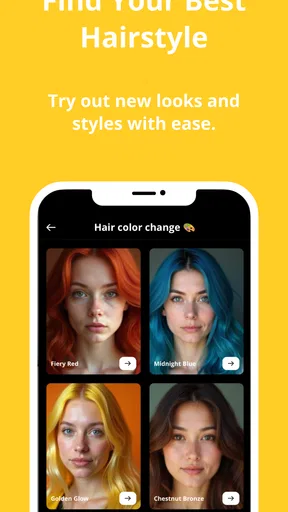
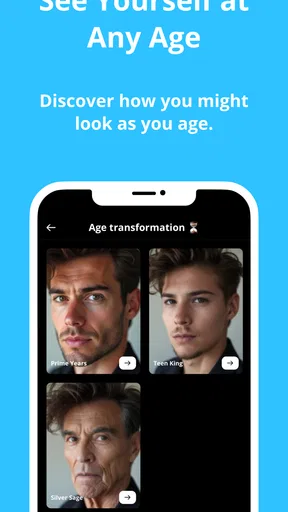

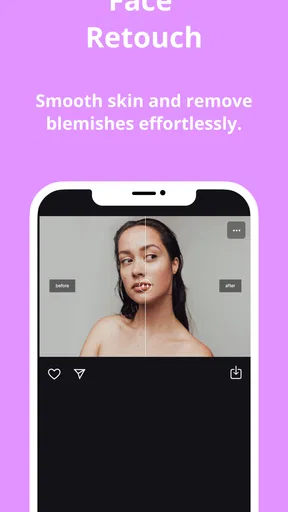
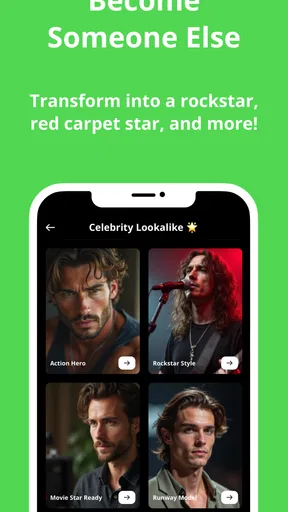

Our Review of Filterly - AI Photo Enhancer
 Analysis by Appyee
I think of Filterly as a quick way to experiment with selfie edits rather than a replacement for a full photo editor. Its focus on AI effects makes it appealing when I want to see how a portrait might look with a different style, a light retouch, or an aging effect, without first learning a complicated set of controls. That narrow focus is useful, but it also means I’d approach it differently from an app built for detailed, repeatable photo work.
Trust starts with what you can actually see
For a face-editing app, my first question is not just whether the result looks convincing; it is whether I feel comfortable choosing a personal photo and understanding what happens next. I would treat the preview and editing process as a chance to make deliberate choices, not as a reason to upload every portrait I have. If a photo is private or sensitive, I’d pause and check the app’s current permission prompts and privacy information before using it.
I also wouldn’t assume that an AI label tells me where image processing happens, how long an image is retained, or whether it is used for anything beyond producing an edit. Those details matter, but they need to be established through clear in-app disclosures or the developer’s current privacy materials. My practical rule is simple: use a photo you are comfortable testing with, and review the visible choices before granting access or continuing.
How I’d approach a first edit
Rather than start with a favorite portrait, I’d pick an ordinary selfie with decent light and a neutral expression. That gives me a useful baseline: I can judge whether a style changes the overall mood, whether retouching still looks like me, and whether an aging effect is playful or too strong. I’d compare the result with the original before deciding to save or share it, especially if the image is intended for a profile where people expect a natural likeness.
One useful habit is to make one kind of change at a time. If I test a style and retouching together, it becomes harder to tell which adjustment caused an artificial-looking result. For a believable portrait, I’d first settle on the overall look, then keep any face refinement restrained. For a joke or creative post, I might push the effect further, but I’d still check that the finished image communicates the tone I intended.
Where it fits among photo apps
Compared with a general-purpose editor, Filterly’s appeal is the portrait-first idea: I can explore AI-led looks without building an edit from exposure, curves, and color controls. A manual editor is still the better choice when I need precise corrections, consistent treatment across a large set, or careful control over every part of the image. A camera’s built-in editor can be more convenient for a quick crop or brightness fix, while a dedicated portrait app may be more suitable if I want a narrowly defined beauty workflow.
The trade-off is that novelty and control are not the same thing. A dramatic AI transformation can be fun to preview, yet less useful when I need a faithful photo for a professional profile, an application, or a family record. I’d use Filterly when exploration is the point, and switch to a conventional editor when accuracy, subtle corrections, or a predictable export matter more.
Who will get the most from it
I can see this working well for someone who takes casual selfies and wants a low-effort way to try different portrait moods before posting. It may also suit a person making a lighthearted before-and-after image for a group chat, or deciding whether a softer or more stylized look fits a social profile. The best use is often a single image where experimentation matters more than a consistent editing recipe.
I’d be more cautious about recommending it to photographers who need dependable batch workflows, exact color matching, or extensive control over facial details. It is also not the right choice for anyone who is uncomfortable processing face images through an AI-oriented service, unless they have reviewed the current privacy disclosures and are satisfied with them. If you mainly want to crop, straighten, or fix exposure, your phone’s standard photo tools may be simpler and avoid adding a separate editing step.
A realistic everyday test
Imagine I take a quick selfie before meeting friends and want a version that feels a little more polished for a profile update. I’d choose a well-lit shot, try a restrained retouch or a couple of styles, and compare each result with the original at normal viewing size. If a filter makes skin look unnaturally smooth or changes my expression, I’d discard it rather than assuming a more noticeable edit is automatically better. Then I’d keep the image only if the finished look still feels like me.
That small workflow also helps me avoid wasting time cycling through effects without a goal. I decide first whether I want a natural touch-up, a distinct visual style, or a deliberately exaggerated result. That makes it easier to stop when I have a usable version instead of treating every available effect as something I need to try.
Before sharing, I’d check the saved image itself rather than judging only the preview. I’d look at the face, edges, and overall crop on the screen where I plan to post it. If the result is meant to represent me in a more formal setting, I’d choose the least transformative version—or use the original—because AI styling can make a portrait feel less authentic even when the edit looks polished.
Cost, access, and choosing carefully
Filterly is free to install, though in-app purchases range from $9.99 to $94.99 per item. I’d explore the available experience before paying and check what a purchase actually unlocks at the moment I’m considering it. Those prices span a wide range, so I would not assume that one purchase covers every effect or that a paid option is worthwhile for occasional edits. The sensible test is whether I return to the app for a specific task often enough to value the extra access.
The app is rated for Everyone, which describes its content classification, not whether every AI-edited portrait is appropriate for every context. I’d still use judgment when sharing altered images, particularly if other people appear in them or if the edit could be mistaken for an unaltered photo. A playful effect is one thing; presenting a heavily changed face as a faithful likeness is another.
What I’d check before trusting a portrait edit
When I open any app that works with selfies, I pay attention to the permission request rather than tapping through automatically. If it asks for photo access, I’d choose the narrowest option the operating system offers that still lets me do the task, where that choice is available. I’d also notice whether the app explains why access is needed and whether I can make a selection without handing over an entire library. These are practical checks, not assumptions about Filterly’s specific permission setup.
I’d look for clear controls around saving, deleting, and account access if they appear in the app, and read the current privacy information for explanations of image handling. If those choices are unclear to me, I would keep sensitive portraits out of the workflow. That is a reasonable boundary for any face-editing tool, particularly when a photo includes a child, a private setting, or another person who has not agreed to be edited.
Another small but useful distinction is between editing a picture of myself and editing someone else’s face. For a friend’s image, I’d ask before using an effect or posting the result, even if the transformation is meant as a joke. AI aging or retouching can change how a person is represented, and consent is a better guide than whether a feature happens to be available.
Practical limits I would keep in mind
AI effects can be unpredictable across different lighting, angles, and expressions. A style that looks appealing on a front-facing, evenly lit selfie may not translate as well to a dim indoor picture or a face turned to the side. I’d test the effect on the actual image I plan to use instead of assuming one good result means it will work equally well on every portrait.
There is also a difference between a preview that looks attractive on a small screen and an image that holds up when enlarged. I’d inspect the saved version for odd edges, overly smooth areas, or details that no longer look natural before using it as a profile picture. If the edit is only for a quick message, I may accept a little artificiality; for a photo I expect to keep, I would be much pickier.
Filterly is a photography app from Asana Rebel, and its positioning makes most sense to me as a focused tool for playful portrait experimentation. It has an average rating of 4.1 from around 6,800 ratings, with about 385 written reviews and over 100,000 installs. It is free to start, rated for Everyone, and its current version is 1.9.1; the listed minimum operating-system requirement is version 7.0. Those details can help set expectations about availability, but they do not tell me whether a particular edit will suit my photo or whether I’ll be comfortable with its data practices.
For me, the decision comes down to purpose and trust. If I want to explore a selfie style quickly and can verify the app’s current permissions and privacy choices to my satisfaction, Filterly is worth trying with a non-sensitive photo. If I need precise retouching, consistent edits, or a clear, fully manual workflow, I’d choose a conventional editor instead. I’d recommend it to a curious casual user, but I would not treat any AI portrait result as automatically natural—or hand over a personal image without first considering how comfortable I am with the process.
Ever had those moments where you snap a photo, and it’s almost perfect, but not quite? Well, that’s where Filterly - AI Photo Enhancer comes into play. I’ve been playing around with this app for a while now, and let me tell you, it’s like having a magic wand for your photos. Let’s dive into what makes this app a must-have for anyone who loves taking photos.
The Magic of AI-Powered Enhancements
First off, the standout feature of Filterly - AI Photo Enhancer is its use of artificial intelligence to automatically enhance your photos. You know how sometimes you just don’t have the time to fiddle with all those sliders and settings? Well, Filterly’s got your back. The AI analyzes your photo and optimizes it for clarity, color balance, and sharpness. It’s like having a pro editor in your pocket!
User-Friendly Interface
Let’s talk about the interface. When you first open the app, you’re greeted with a clean and intuitive layout. Everything is where you’d expect it to be, and the learning curve is practically non-existent. It’s designed for everyone, whether you’re a photography newbie or a seasoned pro. I loved how easy it was to find and apply different filters and effects.
Filters Galore
Oh, the filters! This app isn’t called Filterly for nothing. There’s a wide variety of filters that can completely transform the vibe of your photos. Feeling vintage? There’s a filter for that. Want something more modern and sleek? There’s a filter for that too. The best part? You can stack filters and create your own unique looks. It’s like being a kid in a candy store.
Customization Options
If you’re someone who loves to tweak and customize, you’ll appreciate the manual editing tools. From adjusting brightness and contrast to fine-tuning hues and saturation, Filterly offers a comprehensive set of tools. It’s perfect for those who want more control over the final output. I personally enjoyed playing around with the Blur and Vignette tools to add some artistic flair to my shots.
Batch Processing
One feature that really stood out to me was the batch processing capability. If you have a bunch of photos that need the same enhancements, you can apply changes to all of them in one go. It’s a huge time-saver, especially if you’re editing vacation photos or a series of snaps from an event.
Sharing Made Simple
Once you’ve got your photos looking just right, sharing them is super easy. Filterly integrates seamlessly with social media platforms, so you can quickly post your masterpieces on Instagram, Facebook, or wherever you like to share your work. Plus, the app allows you to save photos in high resolution, so you don’t lose any quality when you export your images.
Filterly - AI Photo Enhancer is a game changer for anyone who wants to elevate their photo editing game without the hassle. Its AI-powered enhancements, combined with a plethora of filters and editing tools, make it a versatile tool for both casual users and photography enthusiasts. If you’re looking to add a little magic to your photos, give Filterly a try. Trust me, your photos will thank you!
Verdict
Strengths of Filterly - AI Photo Enhancer
- Enhances photos with a single tap.
- Supports high-resolution image outputs.
- User-friendly interface with intuitive design.
- Offers a variety of filters and effects.
- Quick processing with AI technology.
Limitations of Filterly - AI Photo Enhancer
- Limited free features; many are paid.
- Occasional app crashes on older devices.
- Lacks manual editing tools for fine-tuning.
- Requires internet connection for AI processing.
- Ads can be intrusive in the free version.
Similar Picks in This Category
View All
Google Photos
Google LLC4.4

Gallery
Google LLC4.2

Picsart AI Photo Editor, Video
PicsArt, Inc.3.9

B612 AI Photo&Video Editor
SNOW Corporation4.1

BeautyPlus-Selfie Photo Editor
PIXOCIAL TECHNOLOGY (SINGAPORE) PTE. LTD.4.5

Remini - AI Photo Enhancer
Bending Spoons4.1
Frequently Asked Questions
What is Filterly - AI Photo Enhancer?
Filterly is an advanced photo editing app that uses artificial intelligence to enhance your images. It provides features like automatic adjustments, filters, and retouching tools to improve photo quality. Available on both Android and iOS, it aims to simplify photo editing for both casual users and photography enthusiasts.
How does the AI technology in Filterly work?
Filterly uses AI algorithms to analyze your photos and make real-time enhancements. The AI identifies elements like lighting, contrast, and color balance, then applies adjustments to improve overall image quality. This technology allows users to achieve professional-grade results with minimal effort, making editing quick and intuitive.
Is Filterly suitable for professional photographers?
While Filterly is designed to be user-friendly for beginners, it also offers advanced features that appeal to professional photographers. Its AI-driven enhancements and customizable settings allow for precise control over image editing, making it a versatile tool for both personal and professional use.
Are there any subscription fees or in-app purchases?
Filterly offers a free version with basic features. However, for access to premium filters, advanced editing tools, and ad-free experience, users may opt for a subscription plan. Pricing details and available options can be found within the app's store page, ensuring transparency before purchase.
Does Filterly support all image formats?
Filterly supports a wide range of image formats, including JPEG, PNG, and TIFF. This compatibility ensures that users can edit most common photo types without issues. For specific format requirements or limitations, users can refer to the app’s FAQ section or customer support for detailed guidance.
